Museum Quality - Lowest Prices
Guidelines for Creating Giclée Prints
from Digital Files
The following guidelines will help you to maximize the results that can be achieved when creating a giclée graphic from a digital file.
1. Make sure that the file you send is at least 200 PPI (pixels per inch)
at the final print image size desired. Avoid taking a low resolution
file and "Re-sampling" it much large using Photoshop.
This will usually leave signs of pixelation.
For example: If you wish to have a final giclée print image size of
24” x 30”on paper or canvas, then your file, when viewed in
Photoshop, should have a native (not re-sampled significantly)
image size of 24” x 30” with a PPI at that size of at least 200.
Sometimes you may acheive acceptable results with files of lesser
resolution but it should not be expected.
2. Acceptable file formats are:
PSD (Photoshop) & TIF - these are the best formats to use when
possible. JGP, GIF & BMP Can be used but usually are not
the best quality possible. Only Send PC Formatted CDs
3. Since different computers, scanners, cameras, and printers have
very different characteristics, color proofing the giclée print
based only on your file is problematic. For us to properly color
correct the giclée proof so that it closely matches your
original and or expectations, the following procedure is necessary.
From within Photoshop, select and printout, at full size, one, two or more significant 8” x 10” subsections of your image and print them on High Gloss Photo Paper and Epson Double Matte Paper using the finest setting of your desktop printer. For example, see the diagram below.
These Are Just Guidelines - Call Us and We Will Be Pleased to Discuss Your Particular Needs. Often We Can Acheive Great Results From a Fine Digital Camera File.
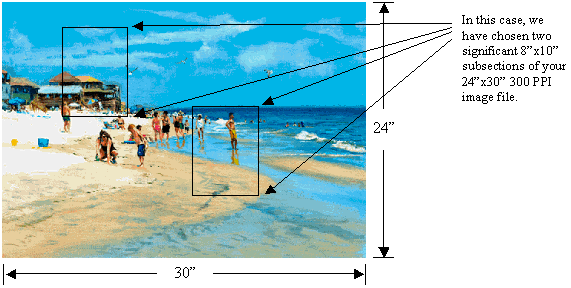
We will use these printouts as our color guide for color correcting. Please note that if you
do not like these subsection printouts then you must adjust your image file using Photoshop,
i.e. adjust color, contrast, brightness, saturation, etc.
What to Send Crimson:
1. Your File on a CD ROM - PC Format
2. The 8”x10” subsections printed full size on
high gloss photo paper and/or Epson Double
Matte paper to be used for color correcting: --->
3. The Crimson Submission Form Filled Out
4. Your Deposit / Payment Check or Credit Card Info
Crimson Atelier, Inc. - The Fine Art Giclee Printer for Printing the Finest Quality Giclee Prints on the Finest Canvas and Fine Art Papers for Artists at the Lowest Price.
Except where you have digitally manipulated an original painting or have created your original digital fine art in Photoshop or some other painting program, Direct Flatbed Scanning of Your Original Painting Gives The Best Results.
Please note that the very best results are always obtained by having Crimson flatbed scan your work directly whenever possible or practicable. And, Most Importantly, having the original to scan also allows us to print several color proofs to closely match your original colors! Because we do not charge any additional scanning or proofing fees, when using our "Quantity Pricing", it is also much cheaper for you. We can Flatbed Scan Originals Up To 40” x 60”.
|
|
|
|
|
|
Crimson Atelier, Inc.
668 Stony Hill Rd
PMB 25
Yardley, PA 19067
Ph 1: (215) 779-3520
Ph 2: (609) 947-1007
Email: info@crimsonatelier.com
URL: http://www.crimsonatelier.co |
Call Us With Any Questions On:
Printing - Publishing - Marketing
With 40 years of experience in these areas,
We Will Be Pleased To Discuss Your Needs |
Call
10 AM to 10 PM
7 Days a Week
Ph 1: 215-779-3520
Ph 2: 609-947-1007 |

TM
TM